
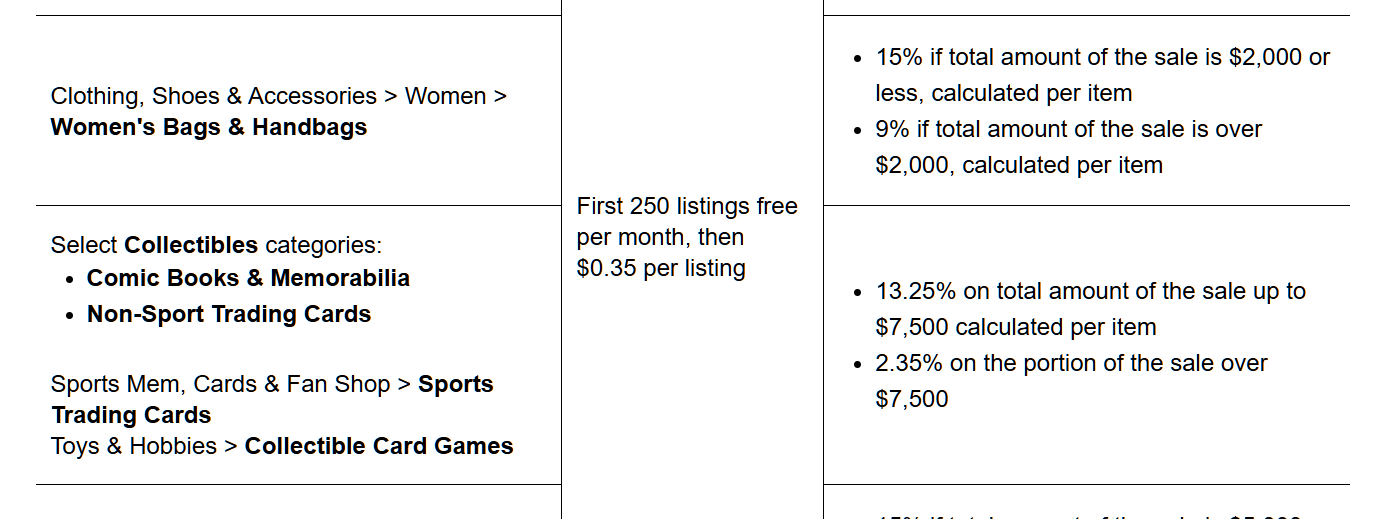
On eBay, an insertion fee is the cost you pay to create a listing. The good news? For most casual sellers, eBay gives up to 250 zero insertion fee listings per month. After you use those up, you start paying an insertion fee on each new listing, usually around $0.35 per listing for non-Store accounts, with some category exceptions.
A few key points about insertion fees and free listings:
- You get a monthly allocation of zero insertion fee listings.
- Once you use them, insertion fees apply to new listings.
- You still always pay final value fees when the item sells.
- Some categories don’t qualify for zero insertion fee listings (e.g. certain Motors, Real Estate, Heavy Equipment).
So in simple terms:
Your first chunk of listings each month is free to create, then eBay charges a small insertion fee for extra listings beyond that.
If you sell a lot, an eBay Store subscription can unlock more zero insertion fee listings and lower final value fees—but it doesn’t automatically increase your selling limits (more on that below).
What are eBay selling limits?
Along with listing fees, eBay controls how much you can sell with monthly selling limits.
If you’re a new seller, it’s common to see something like:
- Limit: 10 items / $500 per month
This limit is there so eBay can test how reliable you are as a seller before letting you access more of their buyer traffic.
Your limit usually covers:
- Total number of active + sold items in a month
- Total value of those items (for example, up to $500/month)
Important details:
- Each active listing and each item sold counts against your limit.
- Good ‘Til Cancelled listings renew monthly and still count toward your limit.
- If you hit your limit, you can’t list more, raise prices, or add quantity until:
- One of your listings ends, or
- The next calendar month begins, or
- eBay increases your limit.
You can see your current limit in My eBay → Selling Overview or in Seller Hub → Overview → Monthly selling limits.
How do selling limits increase over time?
This is the part most sellers really care about: “When will my eBay selling limit go up?”
eBay reviews your account regularly and can automatically increase your selling limit based on:
- Your sales volume (are you using your limit consistently?)
- Your buyer feedback
- Your seller performance metrics (defects, late shipments, cases, etc.)
- How well you follow eBay’s selling policies
According to eBay’s own help pages, if your performance and metrics are strong, you may be able to get your limits increased, sometimes automatically, sometimes by requesting a higher limit.
You typically have three paths:
- Automatic monthly reviews
- eBay periodically checks your account and may simply bump your limit if they like your performance.
- Request a limit increase inside Seller Hub
- Go to your Monthly limits section and click “Request a limit increase” or “Request to list more.”
- Contact eBay support
- Through the Selling limits help section, you can sometimes contact support (chat or phone) and ask for an increase, especially if you’re consistently using your limit and keeping buyers happy.
How insertion fees and limits work together
Think of it like this:
- Zero insertion fee listings = how many listings you can create for free each month.
- Selling limits = how much eBay allows you to list and sell (items + value).
You could still have free listings available but be blocked by selling limits, or you could have room within your selling limit but be out of free zero insertion fee listings, in which case you start paying insertion fees.
That’s why improving your account and increasing your limits is so important:
Higher limits + smart use of free listings = more inventory, more visibility, and more potential sales.
What eBay wants to see before boosting your selling limit
From eBay’s own guidance, they clearly value strong performance and healthy metrics before raising limits.
In practice, that means:
- Upload tracking on time and ship orders quickly.
- Avoid order cancellations caused by being out of stock.
- Keep item not as described cases and returns as low as possible.
- Communicate politely and quickly with buyers.
- Follow eBay’s category rules and policies.
If you regularly use most of your limit, deliver orders smoothly, and buyers leave good feedback, you put yourself in the best position for eBay to say “yes” when you request a higher selling limit.
Simple strategy to grow your limit faster (and protect profit)
Here’s a practical plan if you’re starting with a small limit and worried about listing insertion fees:
1. Use your free listings wisely
Fill your zero insertion fee listings with products that are more likely to sell, not random experiments. Every Good ‘Til Cancelled listing that renews eats into your monthly free allocation, so clear out dead inventory and avoid keeping non-performers live forever.
2. Start with fast-moving, lower-risk items
Use your small limit on cheaper, easy-to-sell items to build feedback and a track record. Once you have a few months of consistent sales, you’re in a stronger position to request a limit increase.
3. Protect your seller metrics
Your Transaction Defect Rate, late shipment rate, and cases opened can make or break your growth. Deliver exactly what you promised, when you promised it.
4. Ask for a limit increase once you hit the ceiling
Don’t wait forever. If you’re:
- Using most or all of your limit,
- Selling smoothly,
- And keeping buyers happy,
then use “Request a limit increase” in Seller Hub or contact support through the selling limits help section.
5. Decide when paying insertion fees makes sense
After your zero insertion fee listings are used, a $0.35 insertion fee per extra listing is often worth it if your profit margin is decent and the item has a good chance to sell.
Think of insertion fees as a small advertising cost: you’re paying a few cents to put your product in front of millions of buyers.
Final takeaway
- Insertion fees only start to matter after you’ve used your monthly zero insertion fee listings.
- Selling limits are the real gatekeeper to scaling your eBay business.
- The more clean, consistent sales you make over time, the more likely eBay is to boost your limit—unlocking more listings, more visibility, and more sales.
If you focus on good listings, strong customer service, and full use of your current limit, eBay will usually reward you with higher selling limits—and those tiny insertion fees will just become part of a profitable, growing business.
Leave a Reply