

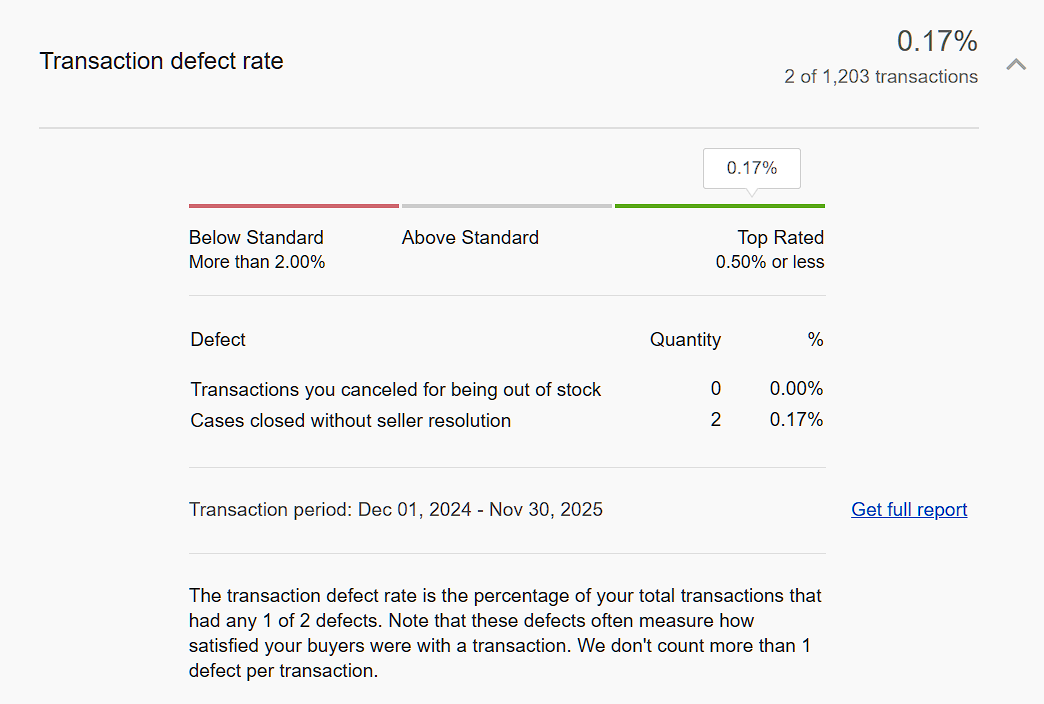
What is Transaction Defect Rate on eBay?
Transaction Defect Rate is the percentage of your total orders that have serious problems from eBay’s point of view.
A “defect” usually means:
- The buyer had a bad enough experience that they had to involve eBay or leave negative feedback
- eBay believes the issue was in your control as the seller
In simple terms:
High TDR = eBay sees you as risky.
Low TDR = eBay trusts you and shows your listings more.
Your screenshot shows 0.17%, which is excellent — but it only stays that way if you protect it.
Why Transaction Defect Rate Is So Important
- Search visibility (Cassini loves low-risk sellers)
Sellers with a clean defect history are more likely to appear higher in search results. More visibility = more clicks = more sales. - Eligibility for “Top Rated Seller” and other perks
A low TDR is one of the conditions for Top Rated status. That badge gives buyers extra confidence and can directly increase your conversion rate. - Account safety
If your defect rate crosses eBay’s thresholds for too long, you may see:- Selling limits
- Listing restrictions
- In extreme cases, account suspension
- Buyer trust and repeat customers
TDR reflects how often things go wrong. Fewer defects usually mean better communication and service, which leads to more repeat buyers and positive feedback.
What Impacts Your Transaction Defect Rate?
Common reasons defects appear on your account:
- Order Cancellations by the Seller
- “Out of stock” or “item no longer available” is a classic defect trigger.
- Cancelling too many orders sends a signal that your inventory and operations are unreliable.
- Item Not Received (INR) Cases Closed Against You
- Buyer opens a case saying they didn’t receive the item.
- If tracking doesn’t show delivery, or you ship late / without tracking, the case can count as a defect once closed.
- Item Not as Described / Significantly Not as Described (SNAD)
- Wrong item sent, missing parts, color/size not matching description, or poor quality vs photos.
- If the buyer wins the case or eBay has to step in and side with them, this can hit your defect rate.
- Negative or Neutral Feedback in Certain Situations
- Some types of feedback can be tied to defects if they highlight serious performance issues (late dispatch, wrong item, poor communication, etc.)
- eBay-Managed Returns & Cases
- When eBay steps in to fix an issue you could have handled earlier (refund, replacement, response delay), that history can contribute to your defect metrics.
How to Avoid Defects and Keep Your TDR Low
1. Get Your Listings and Inventory Right
- Accurate stock levels
Use inventory management tools or manual checks so you don’t sell what you don’t have. - Clear, honest descriptions
- Mention all flaws or used condition issues.
- Use real photos, not misleading stock images.
- Specify dimensions, size charts, compatibility, and what is included in the box.
A buyer who knows exactly what they’re getting is far less likely to open a case.
2. Ship Fast and With Tracking
- Dispatch within your stated handling time
Don’t promise 1-day handling if you realistically need 3. - Use tracked shipping whenever possible
- Upload tracking on time.
- Make sure the tracking actually updates (no fake numbers).
- Package properly
Good packaging avoids damage claims, which often lead to “item not as described” disputes.
When there’s a tracking number that shows “delivered,” eBay is far more likely to protect you in INR cases.
3. Communicate Before It Becomes a Problem
- Reply quickly to messages
Even a short “Thanks for reaching out, I’m checking this now” can calm a worried buyer. - If there’s a delay, tell them
Delayed courier? Weather? Warehouse issue? Inform them before they panic. - Offer solutions early
- Partial refund
- Replacement
- Return label
Many buyers are happy to work things out if they feel heard. That way, they don’t need to involve eBay, and you avoid a defect.
4. Handle Issues Proactively
- Item not received?
- Check tracking first.
- If truly lost, offer refund or reship quickly instead of forcing the buyer to escalate.
- Item not as described?
- Apologize, accept the mistake, and offer a smooth return.
- Don’t argue endlessly; it only increases the chance they escalate to eBay.
The goal is not to “win the argument”; it’s to protect your account health. Sometimes a small loss on one order saves you from a bigger loss on the entire business.
5. Learn From Every Defect
Whenever a defect appears on your dashboard, ask:
- What exactly caused it?
- Could better photos, wording, or packaging have prevented this?
- Is there a recurring pattern (same product line, same courier, same issue)?
Fix the root cause, not just the individual order. That’s how you keep TDR low long term.
6. Request Feedback Revisions When Appropriate
If you resolved an issue nicely and the buyer is happy in the end, politely ask if they’d be willing to:
- Revise negative/neutral feedback
- Update their rating to reflect the final outcome
Don’t pressure them — just ask once, professionally. A few updated feedbacks can reduce visible damage and indirectly support your overall account health.
Final Thoughts
Your Transaction Defect Rate is like your eBay credit score.
It doesn’t scream at you daily, but silently decides:
- How visible your listings are
- Whether buyers feel safe ordering from you
- If eBay will trust you with more sales or start limiting your account
By keeping your listings accurate, shipping on time with tracking, communicating clearly, and solving problems before eBay has to step in, you can maintain a low TDR and build a stable, scalable eBay business.
Treat every order as a small vote of trust in your store — and protect that trust like an asset.
Leave a Reply